Teleport Duels Dagger Combat & Parry Timing
Combat in Teleport Duels revolves around managing your two-stage dagger throw and teleport alongside a timed shield parry and basic melee slashes.
Dagger Throw and Teleport Decisions
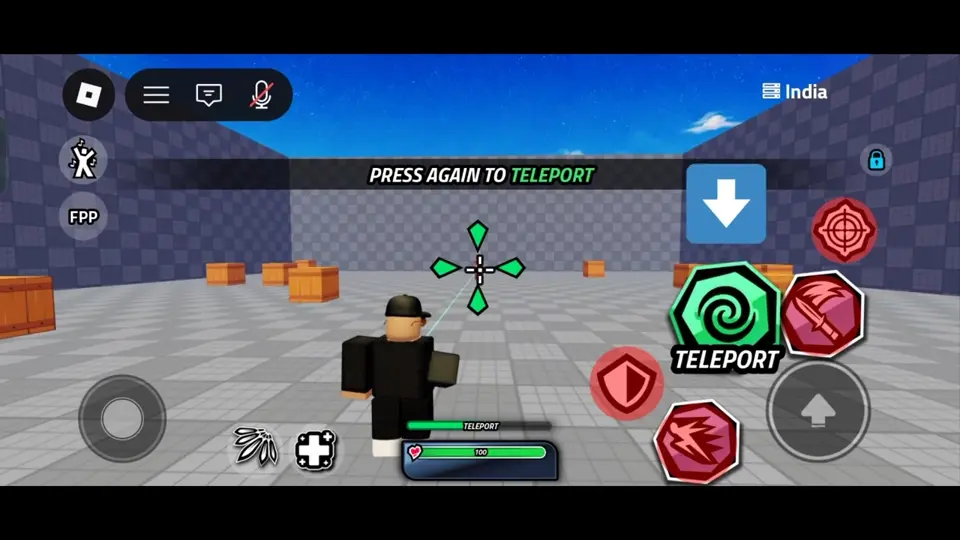
The core movement mechanic is split into two distinct inputs. On mobile, tapping the dagger icon throws the blade and changes that specific button into a green TELEPORT icon, while the adjacent slash button remains separate for melee attacks. On a recorded controller layout, the R1 button handles this dagger throw and teleport sequence.
As tactical advice, you do not need to trigger the second press immediately after throwing the dagger. Holding the second press for a moment lets you observe whether your opponent activates their shield or commits to an attack, allowing you to warp in when it is safer or let the throw pass without teleporting into a trap.
Timed Parry and Defense
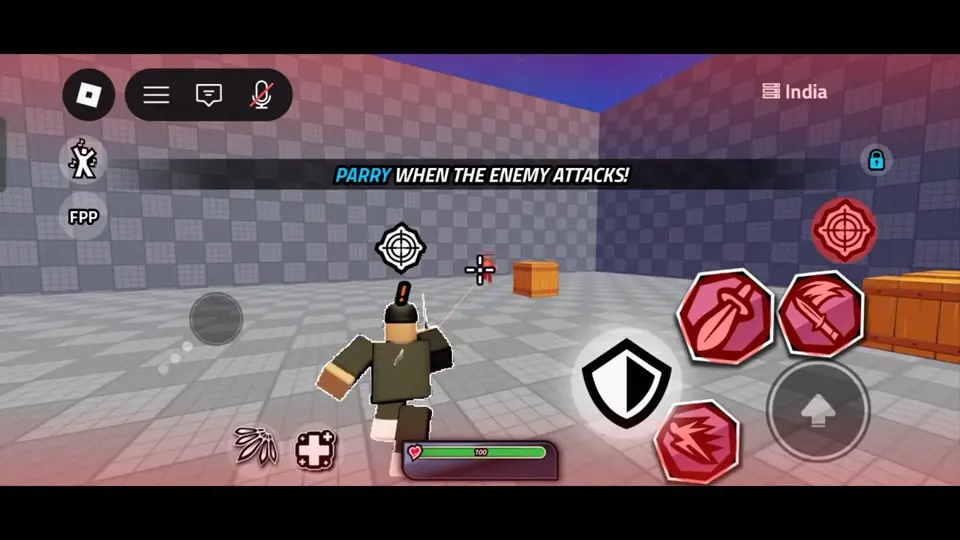
Defending against incoming strikes requires a timed parry using the shield icon on mobile or R2 on the recorded controller HUD. While the recorded onboarding drill displays a red screen flash and warning marker to teach the mechanic, you should not rely on tutorial prompts appearing in standard matches.
Watch your opponent's animations and thrown daggers closely. As a defensive drill, practice tracking where an enemy's dagger travels so you are ready to activate your shield the instant they warp to its location.
Managing Cooldowns and Recovery
Using your combat tools and skills puts their respective HUD icons into a visible countdown state. When your primary movement tool or defensive parry is on countdown, your options for engaging or escaping are temporarily restricted.
As general combat advice, treat an active countdown on your HUD as a cue to create space and play evasively. Avoid initiating reckless close-range exchanges with your basic slash until your teleport or parry icon clears its timer and becomes available again.